

This Report provides details of all Clients who are Off-Service during the search period. The Report displays the type of Off-Service in question and the number of Scheduled Hours the Client is no longer scheduled.
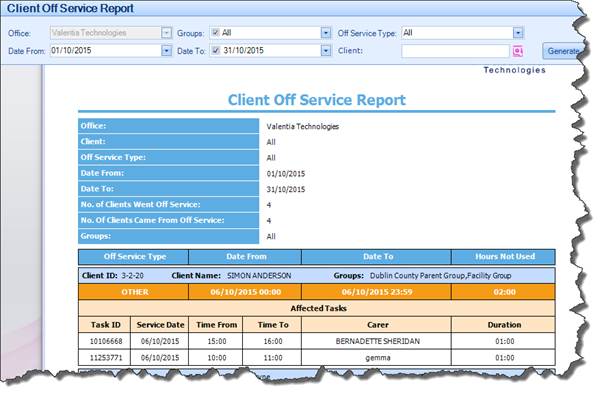
|
Search Parameters |
Definition |
|
Client |
Allows you to search by individual Client, by default results will be displayed for all Clients |
|
Group |
Allows you to search by Group |
|
Date From |
Allows you to define the start date of the search period |
|
Date To |
Allows you to define the end date of the search period |
|
Off-Service Type |
Allows you to search by Off-Service Type (as captured in the Off-Service Wizard) |
|
Columns In Report |
Data Displayed |
|
Client ID |
Client’s ID Number |
|
Name |
Client’s Name |
|
Off-Service Type |
Client’s Off-Service Type |
|
Date From |
Start date of the Off-Service record |
|
Date To |
End date of the Off-Service record |
|
Hours Not Used |
Number of Scheduled Hours that the Client will not be availing of due to this Off-Service record |
|
Groups |
Groups the Client has been linked with |
|
Affected Tasks |
|
|
Task ID |
The Task ID of Tasks affected by the Off Service record |
|
Service Date |
Date the Affected Task was scheduled to take place |
|
Time From/To |
Times the Task was scheduled to begin/end at |
|
Carer |
Name of the Carer who was originally assigned to the Task before the Client was placed on Off-Service. If no Carer was assigned this will appear as Unassigned |
|
Duration |
Scheduled Duration of Affected Task |
|
Total |
Total number of Clients returned in the Report |