

 When updating a Staff Member’s status, you might
have the option of completing a Staff Questionnaire. This will only be
presented to you if, in the configuration of the application, a list of
questions has been defined concerning the status you are updating the Staff
Member to. Any information you enter in the questionnaire will be captured in
the Status History of the Staff Member.
When updating a Staff Member’s status, you might
have the option of completing a Staff Questionnaire. This will only be
presented to you if, in the configuration of the application, a list of
questions has been defined concerning the status you are updating the Staff
Member to. Any information you enter in the questionnaire will be captured in
the Status History of the Staff Member.
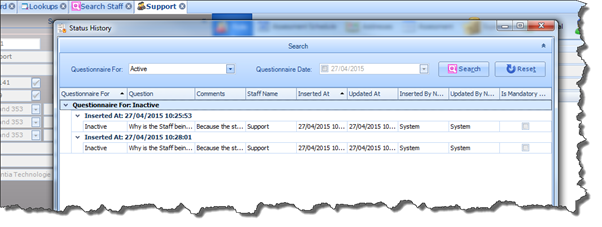
You can view these questions and answers at any time by opening the Staff Member Status History. To do so, simply click on the button beside the Status field:
For full details on how to configure the Staff Questionnaire please refer to Maintenance > Lookups in the Common Options section of this document.