

To capture Leave details for a Staff Member, simply select the Add option. This will open the Leave Wizard:
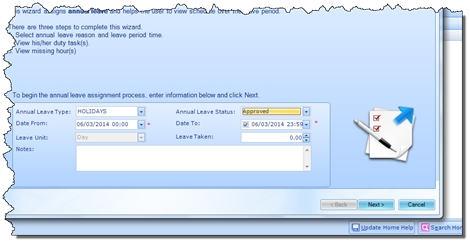
First you will be required to capture the Leave Type. Once this has been selected you can confirm the Leave Status and enter Start and End Dates for the Leave Period.
You do not have to enter an End Date, meaning that the Leave Period can be indefinite. However, if you do enter an End Date, the system will ask you how you wish to define the Leave Duration. You will be given the following two options:
§ Default Hours (Leave Duration will be defined according to the default number of hours in a day configured at setup level)
§ Manual Hours (Calculates the Leave according to the amount you specified in the Leave Taken field)