

In Progress: If you mark the Leave status In Progress, then the Leave captured has not been approved yet and it will have no impact on the Staff Member’s scheduled Assessments. In other words, the Schedules will remain assigned to the Staff Member in question.
Approved: Once you update the Leave Status to Approved, the system will display all the Assessments that are assigned to the Staff Member during the Leave Period and you will be able to carry out any of the following options on each Assessment:
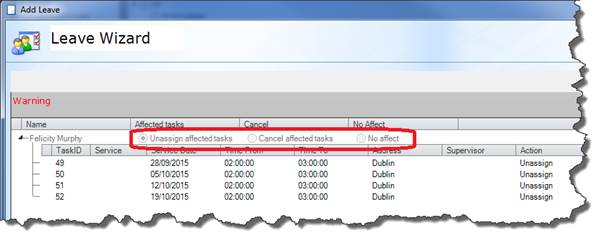
In the event that you select No Effect it will then be your responsibility to reassign the Assessments to an available Staff Member. The system will not prompt you to do this.
|
|
You are unable to remove a Leave record from a Staff Profile once it has been set to Approved. Only In Progress Leave records can be removed from a Staff Profile. This rule does not apply to Clients, Carers or Facilities. |
While a Leave record is set to In Progress, you can update it to Approved simply by right-clicking on the record and selecting Approved.
