

The Staff Contract screen allows you to capture information relating to the Staff Members Contract, including:
|
§ Contract Type § Start and End Date (if any) § Job Title § Department § No of Contract Hours § Grade [may be used to calculate the Staff Leave Entitlement when linked with WTE & Leave Chart. Refer to Look Ups That Define Carer / Staff Leave Entitlements for full details. ] |
§ Joining Date § Division § Salary Scale § Point on Scale § Location § WTE (Whole Time Equivalent) |
It can be accessed via the ribbon bar on the Staff Profile, as illustrated below:
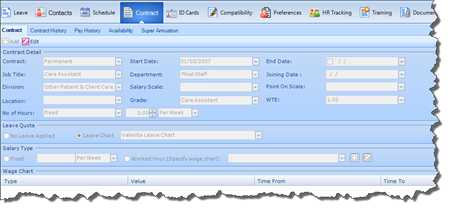
As well as main Contract infomraiotn users can also capture the following details in relation to a Staff Memebers Contract from this interface.