

The Invoice Template 1O Report allows you to generate Invoice Reports for any Payer Types, in any Department for a specified month.
Completed and Confirmed visits appear on this report and as well as this the report also illustrates figures for visits that have been Cancelled but sent to Billing.
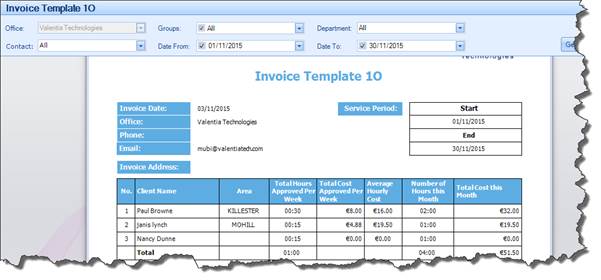
|
Search Parameters |
Definition |
|
Groups |
Allows you to search by Group |
|
Department |
Allows you to search by the Department as captured in the Billing Chart screen of the Scheduling Wizard |
|
Contact |
Allows you to search by Department Contact as captured in the Client Scheduling Wizard |
|
Date From |
Allows you to define the start date of the search period |
|
Date To |
Allows you to define the end date of the search period |
|
Columns in Report |
Data Displayed |
|
No. |
Number generated in the Invoice simply for listing purposes: not to be confused with Client ID |
|
Client Name |
Name of the Client |
|
Area |
Populated by the Town field on the Clients Profile |
|
Total Hours Approved for Week |
This figure is calculated based on the total number of Confirmed Hours, divided by the number of weeks within the searched period |
|
Total Cost Approved per Week |
This figure is calculated based on the total Confirmed Billable Amount, divided by the number of weeks within the searched period |
|
Average Hourly Cost |
This is calculated as follows: The total cost divided by the figure in the “number of hours this month” column. |
|
Number of Hours this Month |
Total number of Completed and Confirmed Hours within the period searched |
|
Total Cost for the Month |
Total Billable Amount as Confirmed on the To Confirm screen within the period searched |
Directly below this table is a Comments/Adjustments area which, once exported, will allow you to add comments to the Invoice.