

The report Invoice Template 6 – All Completed Tasks illustrates to you all Tasks for the searched period that have a Status of Completed. Cancelled Tasks will not appear on this report. Also a Task does not have to be Confirmed to appear on this report.
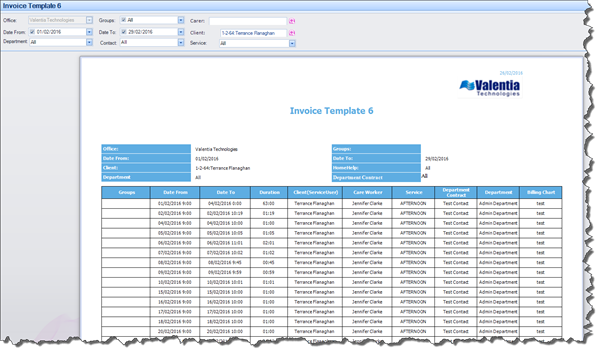
|
Search Parameters |
Definition |
|
Group |
Allows you to search by Group |
|
Carer |
Allows you to search by individual Carer |
|
Client |
Allows you to search by individual Client |
|
Date From |
Allows you to define the start date of the search period |
|
Date To |
Allows you to define the end date of the search period |
|
Department |
Allows you to search by Schedule Billing Department |
|
Contact |
Allows you to search by Schedule Billing Contact |
|
Service |
Allows you to search by Schedule Name |
|
Columns In Report |
Data Displayed |
|
Groups |
This illustrates all Groups a Client is linked with |
|
Date From |
The Actual Start Date and Start Time of the Task |
|
Date To |
The Actual End Date and End Time of the Task |
|
Duration |
The Actual Duration of the Task |
|
Client (Service User) |
The name of the Client that the Task was carried out for |
|
Care Worker |
The name of the Carer that attended the Client Task |
|
Service |
The name of the Service provided to the Client |
|
Department Contact |
The name of the Contact linked with the Schedule |
|
Department |
The name of the Department linked with the Schedule |
|
Billing Chart |
The name of the Billing Chart linked with the Schedule |