

The Mileage Calculation screen allows you to view each Carer’s/Staff Member’s estimated daily Mileage and the cost of that Mileage based on a specified rate and rules applied (e.g. whether there is a minimum distance the Carer must travel to be entitled to remuneration). These rules for the Mileage Calculation tool can be managed from the Office Setup section (please refer to the Office Setup > Mileage Calculation section of this document for full details).
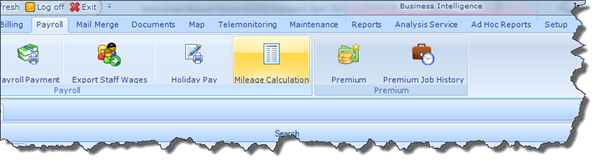
The Mileage Calculation screen can be accessed via the Payroll Module, as illustrated below:
In order for the system to correctly calculate Mileage, the relevant Carer and Client must have their geo-coordinates saved in their Profiles; this can be done via the Carer/Client Address screen.

Once all required settings have been applied and configured on InnovaCare, the system will calculate each Carer’s Mileage with regard to the Carer’s Completed Tasks. The system will base its calculations on the configurations and rules defined for each individual organisation.
Mileage will only be calculated for Tasks that have been Completed or for Tasks that have been Cancelled using any of the following options:
§ Cancel Visit and Billing but Send to Payroll
§ Cancel Visit but send to Billing and Payroll
§ Cancel Visit but send 1/2 to Billing and Payroll
§ Cancel Visit but send Fixed Amount to Billing and Payroll
|
|
Please Note: Mileage Calculation with regard to Cancelled Tasks is configurable for each organisation as required. |
